
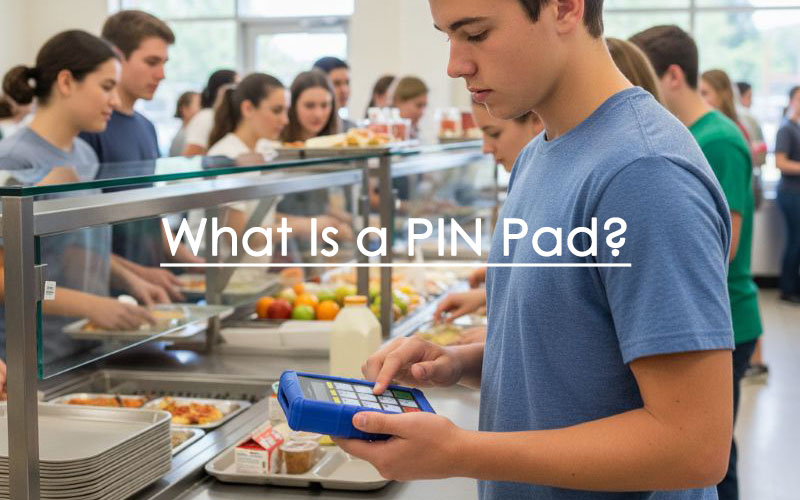
A PIN pad encrypts and accepts your personal identification number when you use debit, credit, smart or student ID cards. You’ll find these devices at payment terminals, ATMs, and integrated school cafeteria point-of-sale systems. PIN pad numbers serve beyond financial transactions.
This piece explains how PIN pads work and their different types. You’ll learn about their key features and ways to merge them with point-of-sale systems. Business owners and curious minds will find a detailed breakdown of PIN pad technology here.
What is a PIN pad and how does it work?
PIN pads act as security gatekeepers for our financial transactions. These specialized electronic devices have a main goal: they securely accept and encrypt your personal identification number (PIN) during payment card transactions.
Capturing and encrypting PINs
The magic happens inside the PIN pad’s secure boundary at the time you enter your PIN. The device encrypts your PIN immediately after you finish entering it. This encryption process uses sophisticated algorithms like triple DES that create an encrypted PIN block.
The security features are impressive – your actual PIN never exists as plain text outside the terminal. Many PIN pads come with tamper-resistant features that guard against physical attacks aimed at stealing encryption keys or installing PIN-stealing bugs.
How PIN pads connect to payment systems
PIN pads merge with point-of-sale (POS) systems in two ways. The POS software can send the purchase amount to the PIN pad, which handles card interaction and PIN entry before sending back the result. Another option lets the core team enter amounts directly on the terminal.
Modern PIN pads use Ethernet cables or Wi-Fi to send encrypted data through secure protocols to payment processors. The PIN pad works as your secure gateway between your card, PIN, and the payment network.
Offline vs. online PIN verification
PIN verification happens through two different methods:
- Online PIN validation: Your PIN gets encrypted and travels to the payment processor’s servers for verification. The host (bank or processor) validates the PIN and sends back an approval response.
- Offline PIN validation: The chip on your card verifies your PIN locally. Your card compares the entered PIN with the one stored on its chip without sending data to external servers.
Both methods keep your information safe, but offline validation proves valuable especially when you have limited internet connectivity, like in metro stations or airplanes. Your card’s configuration profile decides the verification preference, though both PINs must match.
Types of PIN pad terminals
PIN pad terminals are available in many shapes and sizes to meet business needs across different environments. The market provides multiple secure payment processing solutions, ranging from fixed countertops to portable options.
All-in-one countertop terminals
These fixed-location devices serve as the traditional payment processing solution. All-in-one countertop terminals connect through Ethernet or phone line and feature built-in keypads, small monochrome or backlit displays, and receipt printers in some cases. Businesses that value reliability and simplicity over extra features find them useful. Quick-service environments and high-volume retail counters benefit from these terminals where speed matters most.
Connected countertop terminals
Connected countertop terminals differ from standalone units by linking directly to a main POS system. The school cafeteria POS initiates and coordinates school lunch transactions while the terminals display totals, branding, or digital receipts. Most units mount on swivel stands with secure attachments, placing the PIN pad on the customer’s side of the checkout. Supermarkets, big-box retail stores, and pharmacies commonly use this setup.
Portable PIN pads
Portable PIN pads give the flexibility they need for mobile transactions. These battery-powered devices use Wi-Fi or Bluetooth connections so merchants can process payments anywhere – at restaurant tables, curbside, or throughout the store. The DynaPro Go represents this category with its magnetic stripe, EMV chip, and contactless transaction features plus a backlit keypad.
Smart terminals with touchscreens
Smart terminals showcase the latest rise in PIN pad technology. These devices run on modern operating systems (often Android) and do more than just process payments. Their touchscreen interfaces help with customer prompts, digital signatures, tipping options, and loyalty programs. The PAX A35 demonstrates this category’s potential with its vivid touchscreen, front-facing camera for QR code scanning, and support for multiple payment methods. Service-oriented businesses that prioritize customer experience find these terminals substantially more effective.
Key features to look for in a PIN pad
Your school cafeteria needs the right PIN pad. Several crucial features will affect security, usability, and student experience. The right device should meet both operational needs and security requirements.
Support for contactless and digital wallets
PIN pads today must do more than process traditional payments. Your terminal could handle EMV chip cards, contactless cards, and digital wallets like Apple Pay and Google Pay. Digital wallets have become popular – 53% of Americans use them more often than traditional payment methods. Most EMV-compliant contactless terminals accept digital wallet payments right away, making this feature crucial.
Display and keypad design
The way customers interact with your PIN pad matters. Backlit keypads work great in dim lighting, while clear, readable screens make transactions smooth. Physical keypads should give tactile feedback to help all students, including those with special needs. On top of that, privacy shields help prevent “shoulder surfing” in busy places. Color screens can guide users through payments better, but they’re not essential if the layout works well.
Connectivity options: USB, Wi-Fi, Bluetooth
Your PIN pad should work smoothly with your current systems. You can choose from:
- USB (for direct POS connection)
- Ethernet (stable for countertop use)
- Wi-Fi (enables portability)
- Bluetooth (pairs with tablets or phones)
Your business model should guide your choice. Countertop operations need wired stability, while customer-facing businesses might prefer wireless options.
Build quality and durability
PIN pads take a lot of abuse daily. Retail environments with high traffic need tough terminals that can handle constant use. Quality matters – buttons should work smoothly, screens should resist cracking, and ports need to stay secure – that’s where complementary anti-shock covers come handy.
Battery life and power options
Wireless units need batteries that last through a full business day. Look at whether you can replace or recharge the batteries and check charging times.
Security certifications and encryption
Security tops the list of important features. You need:
- PCI PTS certification (global hardware security standard)
- Tamper resistance features
- Point-to-point encryption (P2PE)
- End-to-end encryption (E2EE)
- EMV Level 1 and Level 2 certification
These certifications protect sensitive payment data throughout every transaction.
Integrating PIN pads with School Cafeteria POS systems
PIN pad integration with point-of-sale systems needs the right method selection. Your choice will affect transaction workflows and security compliance requirements.
POS-driven integration
Most cafeterias and businesses opt for off-the-shelf compatibility where POS systems control transaction flow. The software transmits payment amounts to PIN pad terminals. These terminals handle card interactions and PIN entry before sending results back to the POS system. Retail environments benefit from this setup as cashiers work on the main system while customers use separate PIN pads.
SDK/API-based custom integration
Software development kits (SDKs) and application programming interfaces (APIs) give developers direct PIN pad control when custom solutions are needed. This setup allows programmatic access to the reader. You can pair devices, establish connections, and process payments while keeping encrypted communication with payment networks secure.
Cloud-based integration
Cloud platforms let PIN pads talk directly to processors through web services. The POS sends payment requests to cloud services that route them to appropriate devices. This setup reduces compliance scope because the POS system never touches sensitive card data. Multi-location businesses find this advantage particularly valuable.
Remote device management
Large PIN pad fleets need centralized management tools for:
- Device provisioning and registration
- Remote diagnostics and connectivity monitoring
- Firmware updates and configuration changes
- Inventory tracking across locations
Setup and testing best practices
A proper integration combines hardware connection, system configuration, and merchant credential setup with test transactions. You should run simulations of failed payments to verify error handling works as expected.
Conclusion
PIN pads are now the backbone of our daily financial dealings and security systems. This piece shows how these devices guard our sensitive information. They encrypt PINs right away and protect data through advanced security protocols.
School nutrition departments need different types of PIN pads based on their unique needs. The market has everything from basic countertop terminals to smart terminals with touchscreens. So companies can pick options that fit their operations and customer service goals perfectly.
Security should be your top priority when you pick a PIN pad. PCI PTS certification, tamper resistance, and proper encryption must lead your decision process. On top of that, support for multiple payment methods has become crucial as people move toward contactless payments and digital wallets.
Your choice of integration method will affect your entire payment system. Your school needs and technical abilities determine whether you should use POS-driven integration, SDK/API customization, or cloud-based solutions.
PIN pads will keep changing as payment technology grows and new security threats emerge. These small but mighty devices help us grasp the complex security setup that makes our daily transactions safe. They protect our financial data while giving us the ease we expect from modern payment systems.
FAQs
Q1. How does a PIN pad function in payment processing? A PIN pad captures and encrypts your personal identification number during transactions. It immediately encrypts the PIN upon entry, ensuring it never leaves the device in plain text. The encrypted data is then securely transmitted to payment processors for verification.
Q2. What are the main types of PIN pad terminals available? There are four main types of PIN pad terminals: all-in-one countertop terminals, connected countertop terminals, portable PIN pads, and smart terminals with touchscreens. Each type is designed to meet different business needs and environments.
Q3. What key features should I look for when choosing a PIN pad? When selecting a PIN pad, consider support for contactless payments and digital wallets, display and keypad design, connectivity options, build quality, battery life, and security certifications. These features affect usability, customer experience, and overall security.
Q4. How do PIN pads integrate with school cafeteria point-of-sale (POS) systems? PIN pads can integrate with POS systems through various methods, including POS-driven integration, SDK/API-based custom integration, and cloud-based integration. The choice depends on your business requirements and technical capabilities.
Q5. Are PINs more secure than passwords? While PINs are practical for certain applications like unlocking touchscreen devices, strong passwords are generally more secure for protecting online accounts and sensitive information. Passwords offer more complexity and are harder to guess than typical 4-6 digit PINs.
AlphaTechs USA offers a wide selection of innovative solutions designed to improve school lunch experience and make lunch lines go faster including stand-alone pin pads and pin pad scanner combos such as 1D scanners and 1D/2D QR barcode scanners as well as RFID code readers. Each unit comes with a free complementary anti-shock cover designed to keep your devices safe at all time.
Orbital scanners, USB handheld barcode scanners and Bluetooth handheld barcode scanners are also available.
For any school cafeteria pin pad related question, feel free to contact us.
